
To be able to use a FollowMe photocopier, you first need to know what your 4 digit PIN is. The PIN
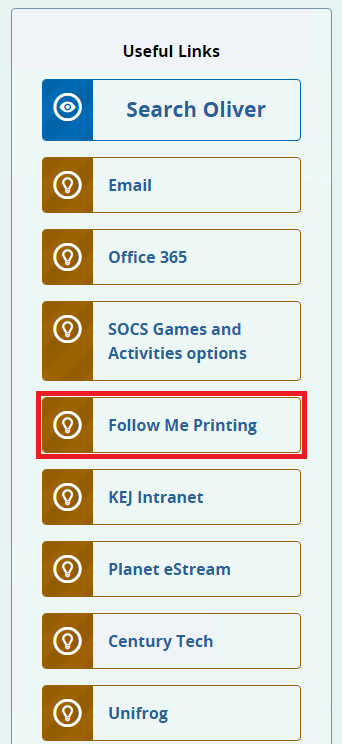
can be obtained by navigating to FireFly and clicking on the FollowMe Printing link under the Useful
Links section of the Dashboard on FireFly, highlighted in red below
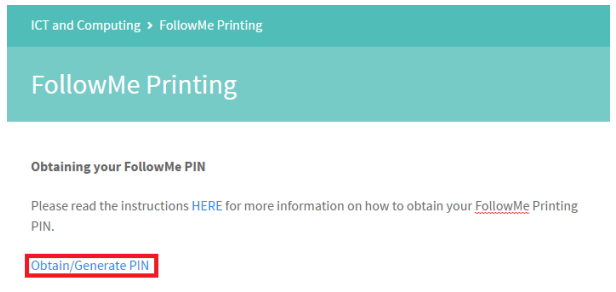
Please click the Obtain/Generate PIN link as highlighted below in red below.
You may have a PIN already assigned to your account. To find it, click the show link highlighted in
red below.
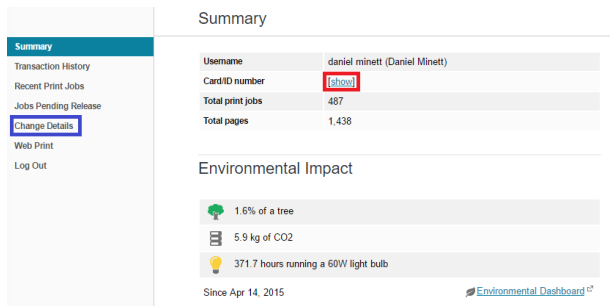
If after clicking show you are being shown (not-defined) then you will need to manually create your
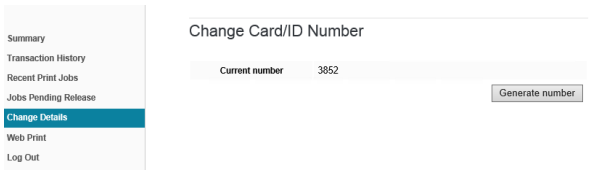
PIN. To do this, click Change Details highlighted in blue above.
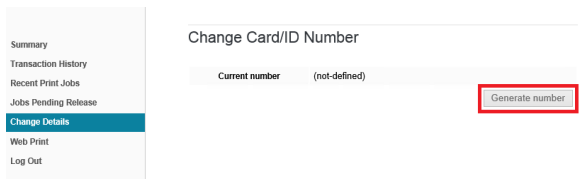
After clicking Change Details, you will need to click Generate number as shown above highlighted
red to obtain your PIN.
The PIN you receive is unique and should be noted down. You can change it anytime using these
steps above. There is a limit to the number of changes that can be made.
The PIN shown in the image (3852) IS NOT your PIN and has been used as a demonstration.
Once you have your PIN, you can close the web pages opened in the above steps.